All three keep track of your films and stream them to your TV, phone and browser. If you are starting fresh, Jellyfin is free and needs no outside account. Plex suits you if you want its apps on many devices, but you sign in with a Plex account. Emby suits you if you already use it or like its apps.
Updated 23 October 2026.
Side by side
| Jellyfin | Plex | Emby | |
|---|---|---|---|
| Price | Free, open-source | Server free; some features need Plex Pass | Server free; some apps and features need Emby Premiere |
| Your account | On your own server | A Plex account | On your own PC |
| Web address on the server PC | localhost:8096 | 127.0.0.1:32400/web | localhost:8096 |
| Port | 8096 | 32400 | 8096, the same as Jellyfin |
| Signing ALT VIDEO in | A six-digit Quick Connect code, or your username and password | Approve ALT VIDEO on Plex’s web page | Your username and password |
| Server setup in our guide | Pictured step by step | In words after the download | Pictured step by step |
Prices and features change, so check Plex’s free and paid features and Emby Premiere’s feature list before you pay for anything. Emby’s web player played our test films without a subscription.
If you already run one, keep it
Don’t move a working collection to a new server just because another one sounds better. If a friend already runs Plex or Emby and will help you, that help is worth more than switching.
Install Jellyfin or Emby, not both. They both use port 8096, so a page at localhost:8096 may belong to the other one.
In ALT VIDEO
ALT VIDEO, our video store game in development for Steam, connects to all three and puts your films on its shelves. It recommends Jellyfin, because Jellyfin’s Quick Connect lets you sign in with a six-digit code instead of typing a password.
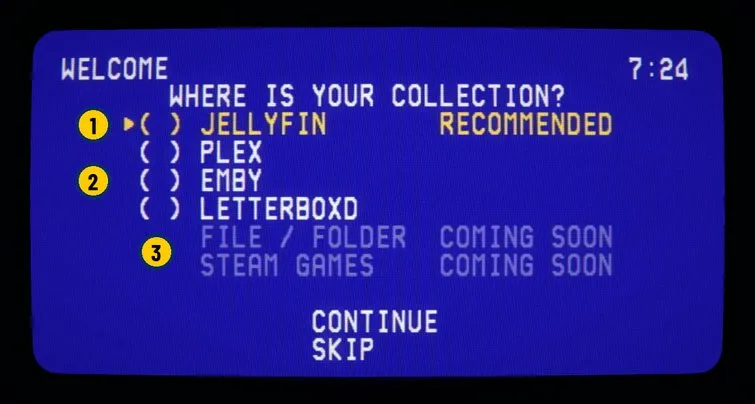
- When ALT VIDEO first asks where your collection is, Jellyfin is marked RECOMMENDED.
- Plex and Emby are supported too. Letterboxd brings in a watchlist or diary, not playable films.
- Files on your PC and Steam games are listed as COMING SOON in this build.